Every region at once
Game or PS Plus prices across 17 regions, sorted by value.
The PS Prices Hub panel appears on game and PS Plus pages, compares 17 regions in your currency and highlights the cheapest one. No account, no extra tabs.
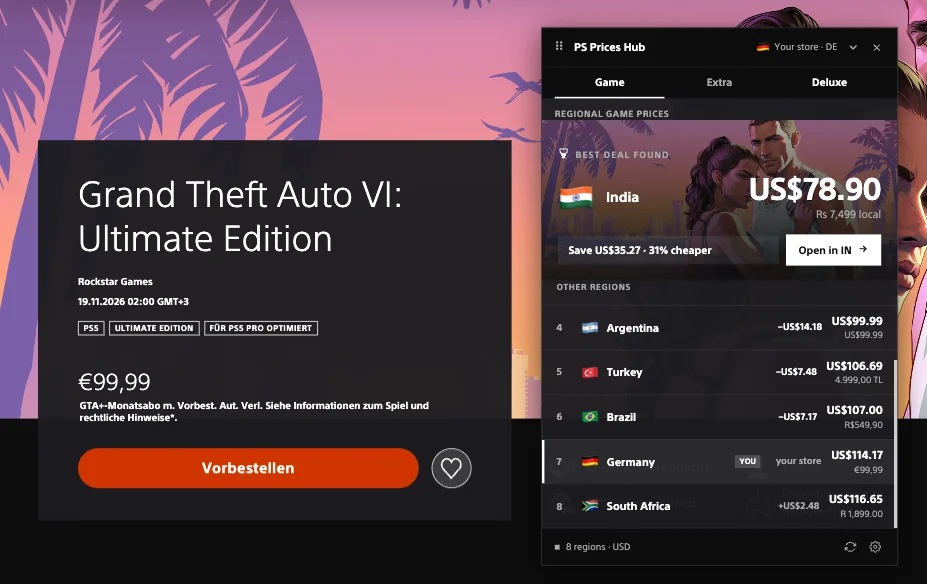
Game or PS Plus prices across 17 regions, sorted by value.
See the best price and the exact saving in your currency.
The store price and the conversion side by side, no calculator.
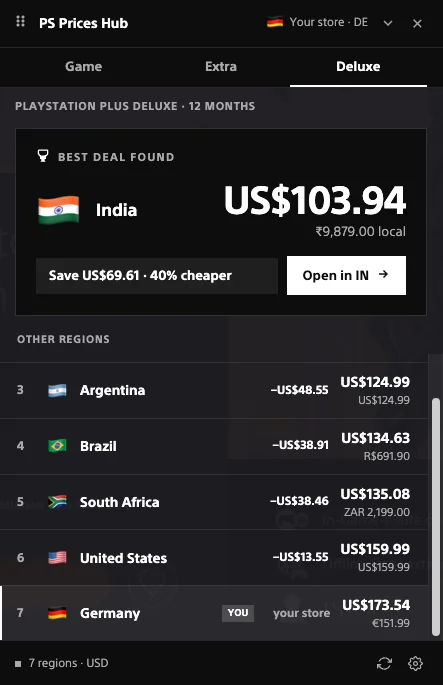
Annual plans by region: the decision that costs more than one game.
The panel compares annual Extra and Deluxe plans across regions, with the local price and the saving against your store.
An annual plan is the biggest PS Plus purchase. Regional differences are larger than on a single game, and the panel shows the exact saving.
Add PS Prices Hub from the Chrome Web Store.
The panel appears on the store.playstation.com page automatically.
Pick a region and open the official store page.
Everything is calculated locally in your browser. We do not collect data or change your PlayStation account.
Privacy policySony sets prices separately for each regional store, tied to local currency and purchasing power. Exchange rates and pricing policy can make the same game or PS Plus plan much cheaper in one region than another.
Yes. The extension is free, with no subscriptions or hidden fees.
No. The extension does not ask you to sign in or access your account data; it reads publicly visible prices on store.playstation.com pages.
No. Everything is calculated locally in your browser and settings stay on your device. We do not send data to a server.
17 PlayStation Store regions at once. The panel highlights the cheapest option in your currency.
No. It only shows prices; it does not switch your account region or make purchases. To buy in another region, you still need to change your store region yourself.
One panel compares prices across every region at once.
 Add to Chrome
 PS Prices Hub is not affiliated with Sony Interactive Entertainment. PlayStation, PSN and PS Plus are trademarks of their respective owners.